Redefining Getsafe’s Infrastructure: Migration Journey from Heroku to AWS [Part 2]
Redefining Getsafe’s Infrastructure: Migration Journey from Heroku to AWS [Part 2]

Redefining Getsafe’s Infrastructure: Migration Journey from Heroku to AWS [Part 2]
Service Migration
In our previous blog, we outlined the reasons behind our migration from Heroku to AWS and Qovery. In this part, we’ll dive into the specifics of our service migration, detailing the architecture, code changes, and the collaborative efforts that made the transition smooth and efficient.
Architecture Overview
Our staging environment is designed to closely mirror our production setup to ensure consistency in testing and deployment. The key components of each environment before migration include:
10 microservices in Heroku: (10 staging and 10 production)
10 Heroku postgres databases: (10 staging and 10 production)
10 Heroku redis instances:(10 staging and 10 production)
Various Heroku add-ons such as Mailgun, Quotaguard, Searchbox
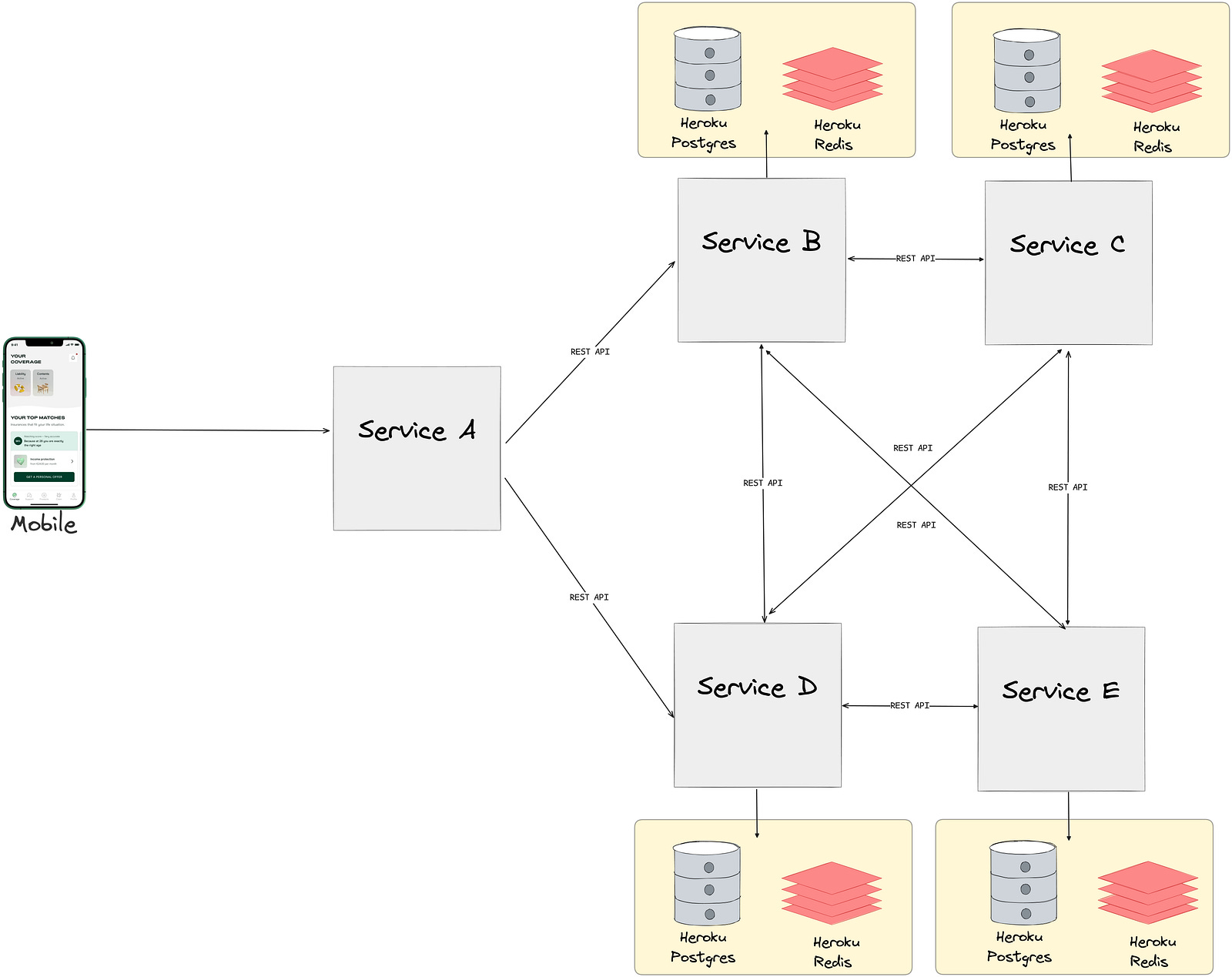
Communication between these services and their components is securely facilitated over the internet using various authentication approaches.
As mentioned in the previous post, one of our key goals was to avoid cross-service communication over the public internet and ensure that persistent storage systems have no public access at all.
Preparing Service Code for Migration
At this point we had all our services dockerized, all necessary Kubernetes cluster setup was up and running for migration. However, there were some code improvements, feature development, and extra instances that we had to alternate for the new environment.
Cache TF Module: We created a Terraform module to manage cache instances and Sidekiq queues, allowing each service to run two separate ElastiCache instances. This module streamlined and automated the caching setup, ensuring consistency across our services.
Maintenance Mode
Due to the nature of our business, we are integrated with numerous third-party SAAS solutions and subscribed to their webhooks. Additionally, our own applications have many scheduled jobs to ensure data consistency. To ensure minimal disruption during migration and provide a way to our customers to communicate with us during downtimes, we came up with a maintenance mode solution for our mobile app and backend services.
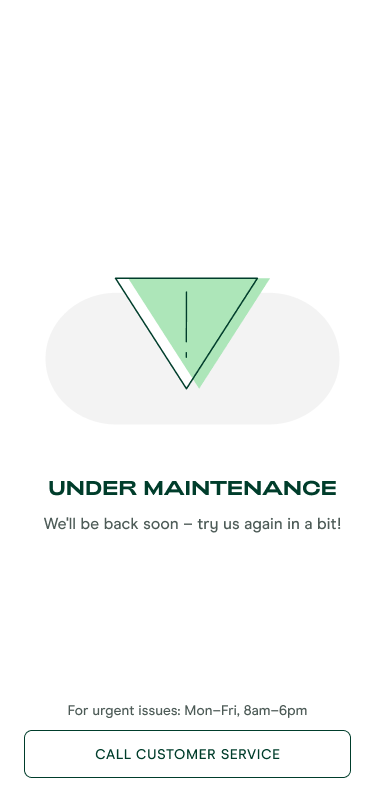
Maintenance mode had the following steps:
Enable the maintenance mode in the Getsafe App: When frontend maintenance mode is enabled our app redirects our customers to customer service.
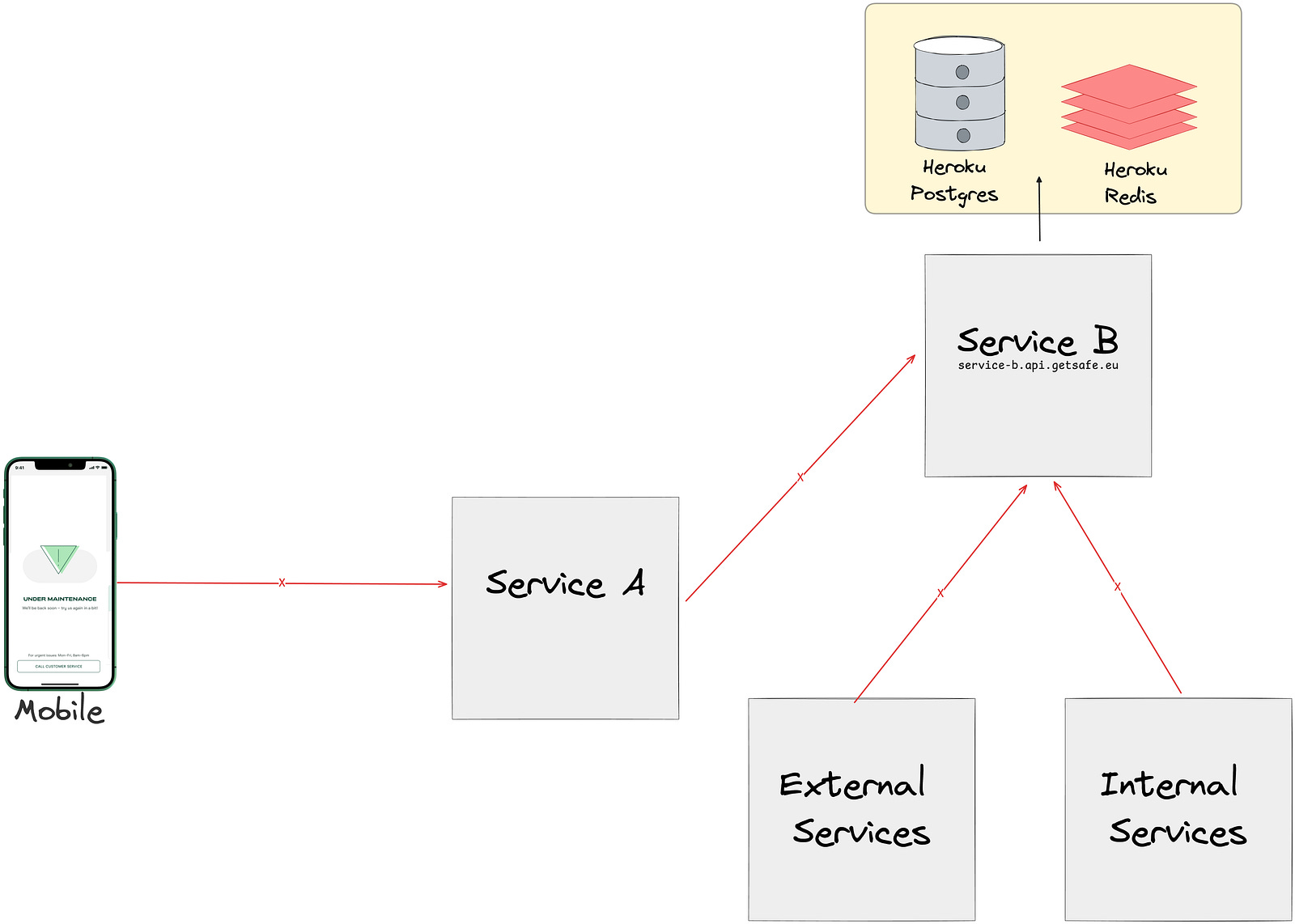
Disabling 1st/3rd party Synchronous Communication: We temporarily disabled inter-service communications to prevent data inconsistencies and alerts during the migration.
Cronjobs and Background Jobs: We halted the processing of background jobs during the maintenance window. Cronjobs continued to run on Heroku while being disabled on Qovery. Once the CNAME records were switched to point to Qovery, background jobs were resumed on Heroku until the full transition was complete.
Essentially, when the Getsafe app entered maintenance mode, no external operations were being written to the database. The only activities continuing were the execution of already queued background jobs within the service.
Migrating Environment Variables from Heroku to Qovery
Transferring correct environment variables was a crucial step of the migration. On Heroku, due to configuration size limitations, at some parts we used native Heroku environment variables prefixed with HEROKU_. This was something we wanted to solve.
So during migration, we aimed to replace these with more meaningful and descriptive variables.
Additionally, certain variables required manual adjustments in the application code. For instance, the Redis URL in Heroku:
HEROKU_REDIS_URL=rediss://user:password@host.com:port/0In this URL, the 0 at the end represents the Redis database instance. If we wanted to create additional databases under the same instance, we had to manually parse this string within application code. This workaround was also something we wanted to eliminate during the migration, so we could have a cleaner, more robust environment variable solution on Qovery.
HerokuEnv Gem
We developed this gem to identify environments under Heroku, but it became redundant as we could now rely on the default Rails.env. Initially, we needed to support both environments because the migration was only starting with staging service. To easily distinguish the environments, we used an environment variable defined by Qovery. If QOVERY_ENVIRONMENT_ID existed, we knew it was a Qovery environment; otherwise, it was either Heroku, development, or a testing environment.
This resulted in code like the following:
env = ENV.has_key?(’QOVERY_ENVIRONMENT_ID’) ? Rails.env : HerokuEnv.envThis approach provided following major advantages:
Dual compatibility allowed us to test the staging environment on Qovery while keeping the production environment stable on Heroku.
Minimal changes to tests to support the new environment so we could solely focus on migration instead of refactoring tests.
Easy cleanup afterwards by simply searching for
QOVERY_ENVIRONMENT_IDin the codebase.
Heroku Database Backup
In Heroku environment, we used a scheduler to periodically take encrypted snapshots of our databases and save them in S3 buckets. In our new setup, we decided to leverage AWS Automated Backups, allowing us to remove this functionality from our codebase.
During the migration
Redis Migration
Since redis mainly stored Sidekiq stats, which aren’t crucial for retaining historical data in Sidekiq dashboards and involved caches with short TTLs, we opted for a straightforward approach by simply swapping instance URLs. The only challenging aspect of this migration was handling the old queued jobs in the redis instance. We had to wait until these jobs were processed. However, because the Heroku database was shared between Qovery and Heroku, and the jobs were either queued once or idempotent, we could allow them to run in the background without any issues.
Web Service and Workers Migration
Web services and workers were created through the Qovery UI, where they were over-provisioned with extra memory and CPU to prevent any potential issues. These services were directly connected to production/ staging databases, allowing us to test various APIs, background jobs, and verify connections to database, redis without exposing new instances to other services. Once the migration is verified and everything functions as expected, we put the app under maintenance (for production services) and switch the CNAME records.
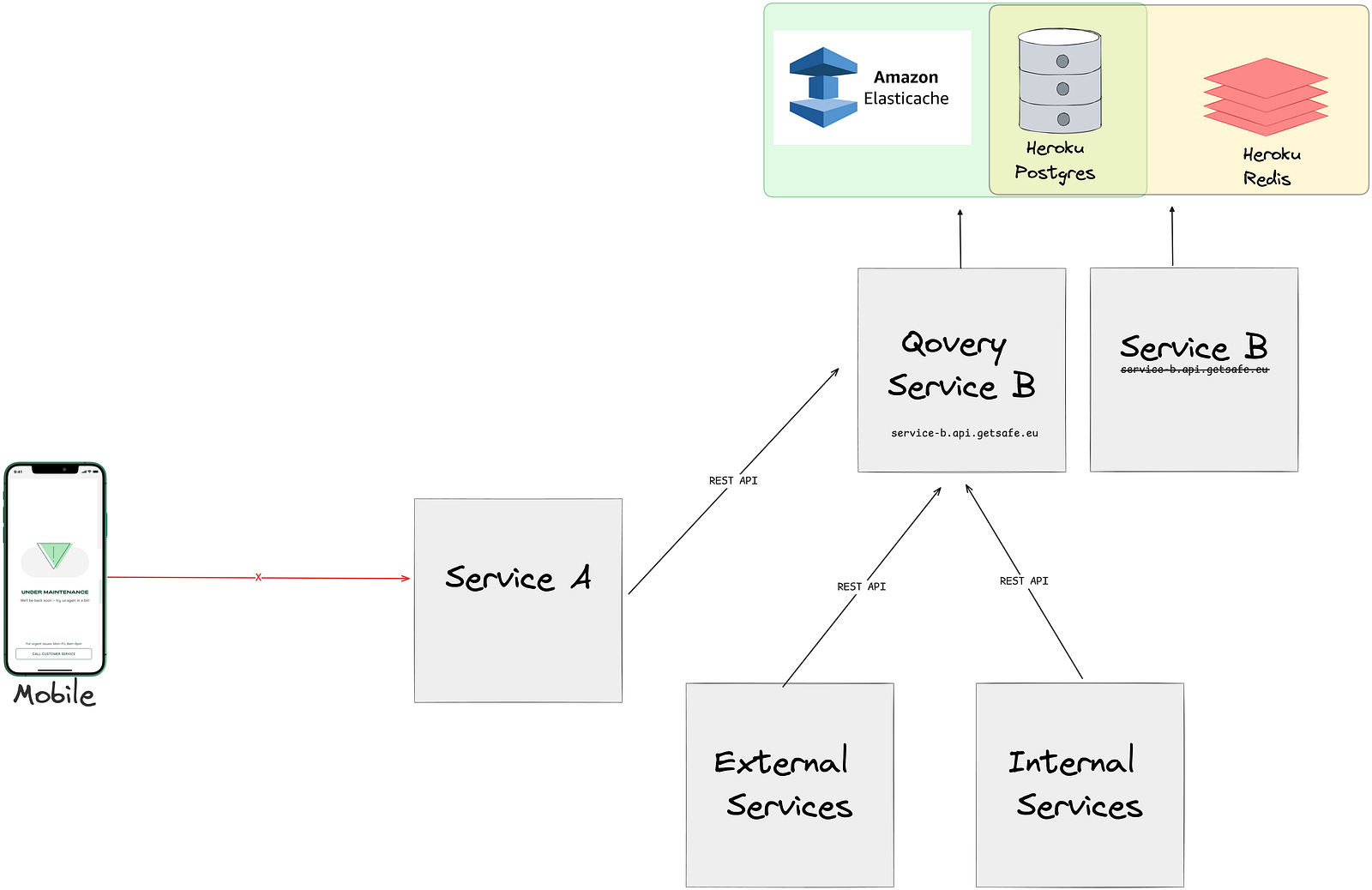
After the CNAME records were updated:
All services started accessing the instances defined under Qovery.
Service B may have still been processing old jobs.
Service B was solely using AWS Elasticache and Heroku PostgresDB
Once there were no more jobs in the Heroku redis queue, it was simply removed.
Post-Migration
Post-migration, we began monitoring performance and stability closely. Since we operate in a highly regulated industry, we intentionally wanted to keep database migrations and service migrations separate so that we can fulfill all GDPR requirements,
However, one major concern that arose post-migration was the high latency caused by the split setup, with databases on Heroku and services on Qovery, despite the regions being geographically close
Heroku in EU-West and AWS Qovery in EU-Central
This screenshot was takenafter the User Service migration, we noticed that the database latency for the service nearly doubled.
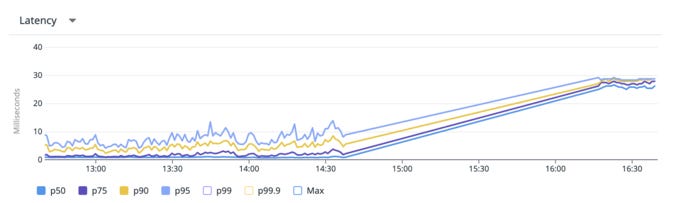
Although latency was high, it didn’t cause any issues for requests that were not bouncing between other services. But this concern had to be addressed in order to continue with migration. This is when we launched a sub-project to migrate our databases, which you can read about here : https://medium.com/hellogetsafe/pulling-off-zero-downtime-postgresql-migrations-with-bucardo-and-terraform-1527cca5f989
Incidents
Of course our sweet journey had some pepper and salt too. During the migration we had two minor incidents.
Untested Flow Resulted In Exceptions
We had one unique flow that was developed years ago and had rarely been modified since and it required a specific libraries to be installed in our base docker image. Unfortunately, our tests did not catch this issue, and this flow was not tested during the staging migration.
As a result, once we migrated to production, we encountered some exceptions.
Fortunately, it didn’t lead to any data loss, although the Docker image we used for this service did not support the necessary package. We had to change our base Docker image, which was a bit daunting given that was an incident. However, we were able to test it in the staging environment, and thanks to our amazing incident response team, the issue was resolved within an hour.
Random Nginx 502 errors
After migrating the admin panel and claims manager panels to AWS, some members of our customer support and claims handling teams experienced Nginx 502 errors.
Although these errors were rare and not visible to customers, they did cause some frustration. Upon investigation, we discovered that the upstream header limit was set too low. While it took us longer to resolve this issue compared to other incidents, the overall impact was minimal.
Some Stats and Outcomes
As we wrapped up our migration from Heroku to AWS, we took the time to analyze our journey and measure key performance metrics and overall system stability.
Downtimes: The longest downtime was 15 minutes for our biggest service.
while most of services were migrated with almost no downtime.
Latency Reduction: Service latencies did not change significantly, but we noticed a reduction in latency affecting customer experience because EU-Central (Frankfurt) is closer to our customers than the previous EU-West region.
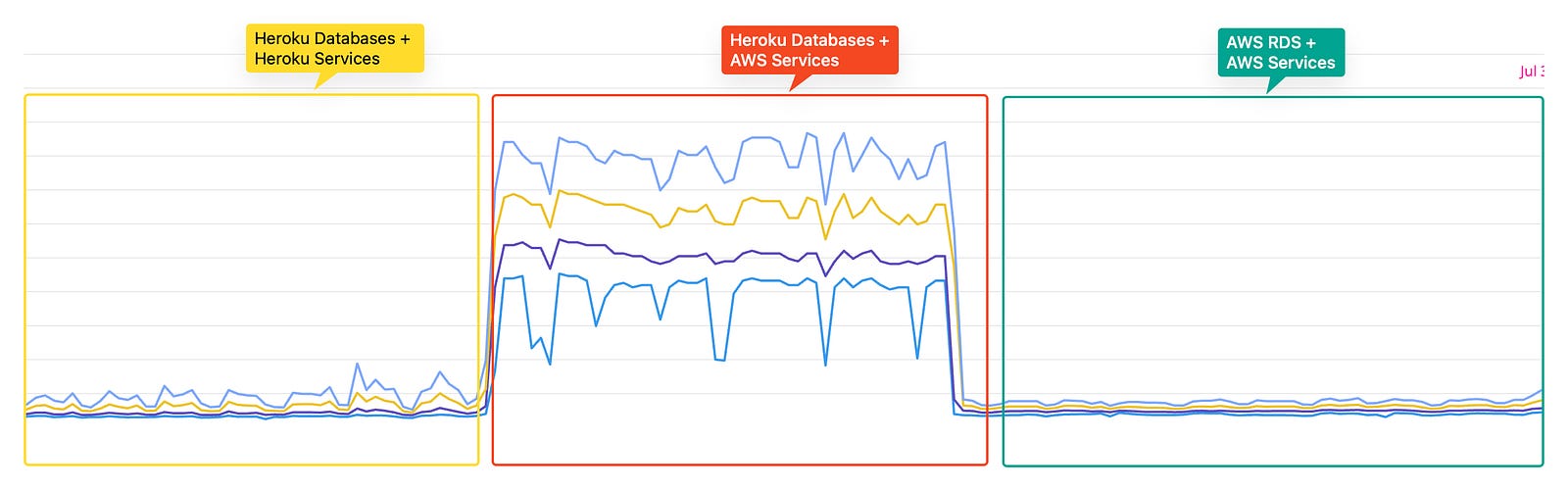
Cost Reduction: Migrating to AWS enabled us to take advantage of reserved instances and better resource allocation, leading to a decrease in monthly infrastructure costs. The use of Terraform for provisioning also contributed to more predictable and manageable spending and we will share more about it in part 3!
Uptime Improvements: Since the migration, our uptime has remained similar. However, with full control over our infrastructure, we can avoid the lengthy maintenance windows that Heroku imposed.
Better observability and monitoring: Now we leverage from native datadog Agents in Kubernetes that is hosted on our own datadog account so we can monitor our infrastructure and applications better.
Deployment Times: Our deployment times were similar to Heroku. But with new infrastructure we can define some tweaks on streamlined CI/CD.
Identify bottle necks and decrease deployment times. We’ll share more about fine tunings and provisionings in part 3.
Conclusion
Overall, the migration from Heroku to Qovery and AWS has been quite a journey for Getsafe. By enhancing our infrastructure, we not only improved system performance and reliability, but also positioned ourselves for future growth. We’re excited about the road ahead as we continue to refine our architecture and deliver exceptional service to our users.
Acknowledgments: Special thanks to the Getsafe engineering team for their hard work and the Qovery team for their support in making this migration seamless.